
Telegram Disruptions Extend Beyond National Borders
Temporary disruptions of Telegram services in a given region can unexpectedly spill into neighboring network environments due to upstream routing dependencies and regional transit infrastructure. As access to Telegram’s direct infrastructure becomes unreliable across various telecom carriers, users frequently turn to one of Telegram’s native, built-in features: MTProto proxy support.
Unlike traditional Virtual Private Networks (VPNs) that tunnel all device traffic through an encrypted channel, Telegram’s MTProto proxies operate entirely inside the application ecosystem. They reroute only Telegram communications through intermediary servers, preserving normal, un-proxied internet access for all other applications. Telegram originally introduced this mechanism to maintain platform availability in regions facing heavy censorship, IP blocking, or infrastructure interference — and the mechanism has been battle-tested across multiple major blocking campaigns since 2018.
During network outages, free public proxy services — such as those operated by StormyCloud — and community-driven proxy repositories see an immediate surge in traffic. Because these systems rely on Telegram’s custom MTProto protocol, they can be imported directly into the application with a single click, completely removing the need to install third-party software.
Historical Context: The Censorship Campaigns That Shaped MTProto
Understanding why MTProto proxy evolved the way it did requires a brief look at the blocking campaigns that drove each generation of the protocol.
Russia, 2018–2020
On April 16, 2018, Roskomnadzor — Russia’s telecommunications regulator — began blocking Telegram after it refused to hand over encryption keys to the FSB. The enforcement strategy escalated rapidly. Roskomnadzor banned over 1.8 million IP addresses belonging to Amazon and Google’s cloud infrastructure in the opening days of the campaign, with the total eventually exceeding 19 million addresses. The collateral damage was severe: online banking services, booking sites, shopping platforms, and at least six online media outlets found their websites temporarily blocked.
The ban failed on its primary objective. Telegram was, anecdotally, more or less easy for Russians to use throughout the two-year period, and the app’s Russian user base doubled from approximately 15 million in April 2018 to 30 million by June 2020. On June 18, 2020, Roskomnadzor lifted its ban after Telegram agreed to help with extremism investigations.
The episode is now a canonical case study in the limits of IP-level censorship against a platform that could dynamically reroute through cloud infrastructure. The failure pushed the Kremlin to develop a far more effective system for controlling the internet — one that has since been used to block services including Facebook, YouTube, LinkedIn, and X.
The confrontation is not resolved. On February 10, 2026, Roskomnadzor officially confirmed a new round of throttling Telegram’s service across Russia, citing violations of Russian law.
Iran, 2018–Present
Telegram has been officially blocked in Iran since 2018, with periodic intensification during political events. Iranian authorities deployed DPI systems at the ISP level to identify and drop MTProto traffic. The consequences for MTProxy development were direct: a 2018 GitHub issue filed against the official TelegramMessenger/MTProxy repository by an Iranian developer stated plainly that Iran’s DPI filtering equipment had detected MTProto Proxy’s custom encryption method and was automatically banning proxy IPs — including unpublished proxies that had never served a user. The developer’s demand — that Telegram make the traffic indistinguishable from standard TLS — became the specification for FakeTLS.
China: Indirect Influence via Active Probing Research
Although Telegram is formally blocked in China, the Great Firewall’s anti-circumvention techniques have had a significant indirect influence on MTProxy’s design. Research on active probing techniques shows that sophisticated censors can send synthetic connection attempts to suspected proxies and observe the response patterns to confirm protocol identity without ever decoding the encrypted content. This attack vector — first extensively documented against Tor bridges — informed the design of FakeTLS’s active-probing resistance, which returns a legitimate TLS handshake to unexpected connections rather than silently dropping them.
Understanding Telegram’s MTProto Architecture
Standard Connection Model
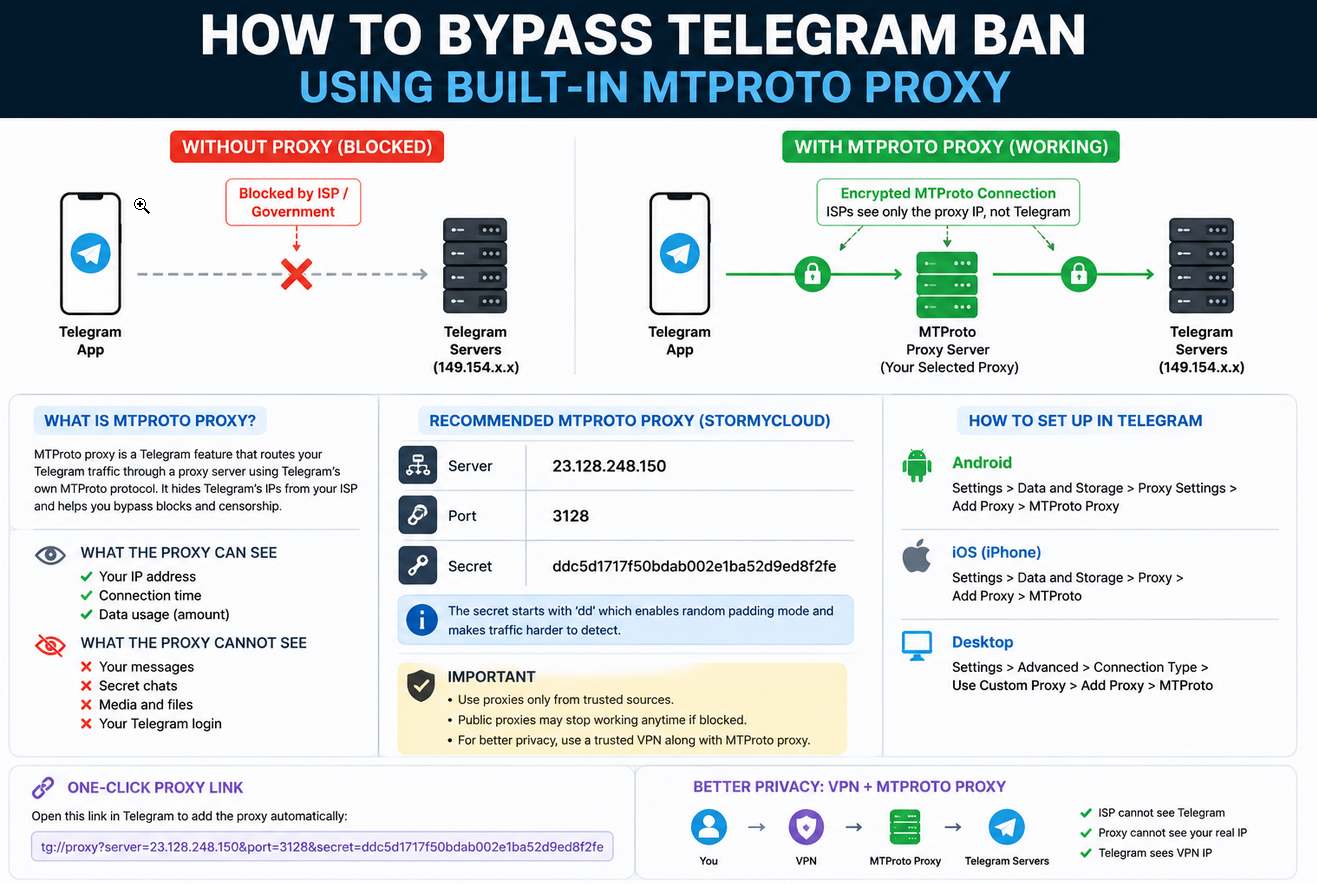
Normally, Telegram communications rely on a direct client-to-server model:
[User Device] ──(Direct Internet Traffic)──> [Telegram DC]
When network operators implement IP-based blacklisting, DNS filtering, or route manipulation, this direct path is severed.
MTProto Proxy Connection Model
MTProto inserts an intermediate relay layer into the transport path:
[User Device] ──(Obfuscated Traffic)──> [MTProto Proxy] ──> [Telegram DC]
From the ISP’s perspective, the user’s traffic moves toward the proxy’s IP address rather than Telegram’s known address space. Critically, the proxy acts as a transport relay only — it does not terminate the encrypted session:
[Telegram Client]
      │
      │  AES-256-IGE encrypted payload
      ▼
[MTProto Proxy Daemon]          ← sees only encrypted blobs; no session context
      │
      │  encrypted payload forwarded unchanged
      ▼
[Telegram DC — 149.154.x.x / 91.108.x.x]
                                ← performs authentication, key exchange, session mgmt
The proxy does not get readable Telegram messages. It sees an encrypted byte stream and forwards it. This is an architectural property, not a marketing claim.
Core Parameters
An MTProto proxy configuration requires exactly three parameters:
- Server Address: The destination IP or domain name.
- Port Number: The specific port handling the traffic.
- Secret Key: An authentication string whose prefix encodes the obfuscation mode (see below).
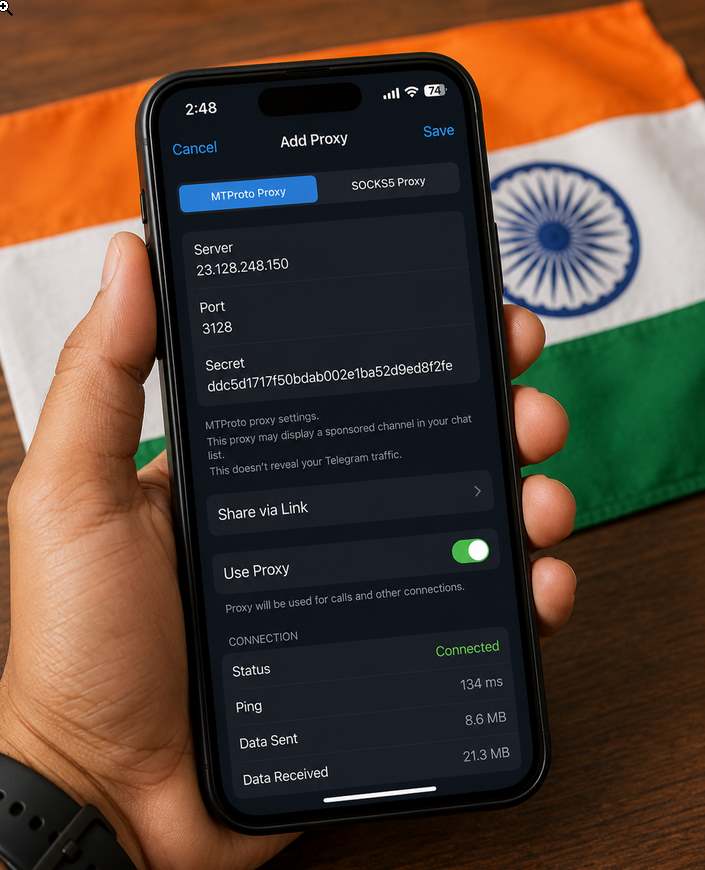
A widely used public endpoint published by StormyCloud uses the following configuration:
- Server:
23.128.248.150 - Port:
3128 - Secret:
ddc5d1717f50bdab002e1ba52d9ed8f2fe
Secret Key Formats and Their Practical Status
MTProto proxy secrets come in two main flavors. Most modern Telegram clients accept either, but the padded form is recommended because it enables random padding on the wire, making the traffic look less distinctive to deep packet inspection.
| Prefix | Total Length | Mode | Practical Status (2026) |
|---|---|---|---|
| (none) | 32 hex chars | Plain obfuscated MTProto | Obsolete — detectable by DPI within seconds of the first packet |
dd | 34 chars (dd + 32 hex) | Randomized padding | Degraded — was often sufficient from roughly 2019 to 2022 but is no longer reliable in heavily filtered networks; modern filtering identifies these patterns statistically |
ee | Base64 string | FakeTLS / HTTPS camouflage | Current de facto standard among censorship-resistant deployments |
On the dd prefix specifically: The dd prefix is prepended to the 32-character base secret, yielding a 34-character total string. Adding dd to the front of a secret (e.g., cafe...babe → ddcafe...babe) enables random padding mode on the client side, inserting random bytes into packet headers to obscure packet-length patterns. This was a meaningful defense against early DPI systems. It is no longer sufficient as a primary strategy in Russia, Iran, or China.
Note: Telegram itself has not formally deprecated dd. The shift to ee as the default is a community-driven response to operational blocking, not an official protocol deprecation.
Protocol Version Context: MTProto 2.0
The proxy infrastructure described in this article runs on MTProto 2.0, introduced with client v4.6 in December 2017, replacing SHA-1 with SHA-256, redesigning message key derivation so msg_key is strongly bound to both the message and the auth key, expanding random padding to 12–1024 bytes, and adding a client challenge mechanism to prevent replay attacks. Messages are encrypted with AES-256-IGE; the key and IV are derived from auth_key and msg_key. The handshake uses Diffie-Hellman with RSA key verification to prevent man-in-the-middle attacks.
MTProto 2.0 received a cryptographic audit by researchers at the Università degli Studi di Udine in 2020, adding a degree of independent academic scrutiny that earlier versions lacked. MTProto 1.0 (2013–2017) has been fully discontinued for new sessions.
Native MTProto Support Removes VPN Dependence
Because MTProto is implemented directly inside official Telegram applications (Android, iOS, Windows, Linux, and macOS), it bypasses several downsides associated with OS-level VPNs:
- Scope-Specific Routing: Only Telegram traffic is redirected. Browsers, banking apps, and streaming services run at full speed over the normal connection.
- No Elevated Privileges: No root access, administrator rights, or system-level VPN profiles required.
- Visual Validation: A shield icon appears at the top of your chat list whenever a proxy connection is active. Tapping it opens proxy settings directly.
- Promoted Channel Disclosure: After connecting to an MTProto proxy, you may see an unfamiliar channel appear in your chat list. This is a channel being promoted by the proxy operator to offset their server costs. The proxy operator cannot access or see your chat list or Telegram activity in any way. This is standard behavior for public proxies and is disclosed in Telegram’s official documentation. The channel disappears immediately when the proxy is disconnected.
Step-by-Step Configuration Guides
1. Telegram for Android
- Open the side menu and go to Settings.
- Tap Data and Storage.
- Scroll down and select Proxy Settings, then tap Add Proxy.
- Choose MTProto Proxy and populate the fields:
- Server:
23.128.248.150 - Port:
3128 - Secret:
ddc5d1717f50bdab002e1ba52d9ed8f2fe
- Server:
- Tap Save and toggle Use Proxy to active.
2. Telegram for iOS
- Navigate to Settings → Data and Storage.
- Scroll to the bottom and select Proxy → Add Proxy.
- Choose MTProto and fill in the identical Server, Port, and Secret values.
- Confirm. No device-wide iOS configuration profiles or system certificates are modified.
3. Telegram Desktop (Windows, macOS, & Linux)
- Open Settings → Advanced.
- Under Connection Type, select Use Custom Proxy.
- Click Add Proxy, choose MTProto, input the values, and save.
Tip: All clients allow multiple proxy configurations to be stored simultaneously. If one public proxy becomes unreachable, you can switch to a backup without restarting the application.
One-Click Deployment via URI Links
Telegram supports two URI formats for automated configuration:
Native deep link (opens Telegram directly):
tg://proxy?server=<SERVER>&port=<PORT>&secret=<SECRET>
Web redirect (browser falls back to the deep link):
https://t.me/proxy?server=<SERVER>&port=<PORT>&secret=<SECRET>
Both forms trigger the same in-app “Connect Proxy” prompt. The official @MTProxyBot on Telegram can generate these links automatically for proxy operators. For the StormyCloud public server:
https://t.me/proxy?server=23.128.248.150&port=3128&secret=ddc5d1717f50bdab002e1ba52d9ed8f2fe
Packet Flow, Encryption, and Privacy Realities
MTProto proxies do not terminate Telegram’s underlying encryption layer. The proxy relays encrypted blobs between the client and Telegram’s data centers; it holds no session keys and cannot read message content. Secret Chats run independent end-to-end encryption on top of this network layer, adding a second cryptographic boundary.
However, proxy operators can and do observe metadata:
- Source IP address
- Session connection timestamps and duration
- Aggregate data volume
- Connection frequency patterns
The correct framing is this: MTProto relays cannot directly observe account identifiers or message contents, but they can collect sufficient metadata to support correlation attacks. A proxy operator who logs source IPs and connection timing across a large user base can, in principle, correlate those patterns with other datasets. You should only connect to nodes you trust, since a malicious operator could record your IP address, the times you connect, and the simple fact that you are attempting to use Telegram. For high-risk threat models — journalists, activists, or dissidents operating inside restrictive regimes — a vetted private deployment is preferable to an anonymous public list.
The Censorship Cat-and-Mouse Game
1. IP Blacklisting
The bluntest instrument: block the proxy’s IP address outright. When large user volumes concentrate on a single endpoint, automated firewall systems log the anomaly and drop packets to that destination. The 2018 Russia episode illustrated the limits of this approach at scale — when Telegram dynamically shifted to AWS and Google infrastructure, Roskomnadzor’s attempt to follow it caused collateral damage across tens of millions of unrelated IP addresses, undermining the operation politically and practically.
2. Deep Packet Inspection (DPI) and Fingerprinting
Advanced networks deploy DPI appliances to evaluate traffic patterns — packet sizes, inter-arrival timing, connection handshake sequences — rather than destination addresses alone. Even fully encrypted payloads carry behavioral fingerprints. Russia’s TSPU (Technical Means of Countering Threats) hardware is installed inside ISPs — including Rostelecom, Megafon, MTS, and Beeline — and performs real-time DPI, traffic classification, throttling, and route manipulation at the carrier level. The 2018 failure pushed the Kremlin to invest heavily in this infrastructure; TSPU has since been used to throttle or block Facebook, YouTube, LinkedIn, and X. It represents Russia’s operationalized equivalent of China’s Great Firewall.
3. Active Probing
When a censor detects a persistent encrypted stream toward an unknown IP, it may dispatch an active probing server — an automated system that initiates its own connection to the suspected proxy, masquerading as a legitimate Telegram client. If the target responds with MTProto protocol behavior, its identity is confirmed and it is immediately blacklisted. This technique was extensively documented against Tor bridges in China and has influenced how Iran’s filtering infrastructure operates against MTProto endpoints. The Iranian developer’s 2018 GitHub report — describing an unpublished, never-distributed proxy being blocked before any user had connected to it — is consistent with exactly this active probing pattern.
Advanced Defenses: FakeTLS and Private Deployments
FakeTLS (ee prefix) — De Facto Standard for Censored Regions
FakeTLS makes MTProto proxy traffic pretend to be HTTPS web traffic — technically speaking, TLSv1.3 + HTTP/2. Instead of presenting as arbitrary encrypted data, the connection mimics standard HTTPS handshakes used by major web services:
[User Device] ──(TLSv1.3 + HTTP/2 handshake)──> [Proxy] ──> [Telegram DC]
            ↑
      DPI system sees: ordinary HTTPS session to an unclassified host
DPI systems perceive the session as standard secure web traffic, making protocol classification significantly harder. The recommended combination in 2026 is FakeTLS (EE mode) with random padding of 12–1024 bytes and no SNI leakage — the strongest currently available configuration against DPI.
An additional layer of protection against active probing: when a FakeTLS proxy receives a connection that fails the MTProto handshake — such as a probe from a censor’s infrastructure — it returns a real TLS handshake from a local web backend rather than silently dropping the connection. A silent drop is itself a signal; a legitimate TLS response is not.
I2P Endpoint (StormyCloud)
For users requiring an additional anonymity layer, StormyCloud operates the same MTProto proxy as a hidden service over the I2P network, using an I2P destination address with the same shared secret. A standard I2P client tunnel can be configured to point at the destination, and Telegram is directed at the resulting local port.
Personal VPS Deployments
Because public proxy networks concentrate large traffic volumes onto visible, enumerated IP addresses, advanced users deploy private MTProto proxies on personal VPS infrastructure via providers such as AWS Lightsail, DigitalOcean, Hetzner, or Oracle Cloud:
[1–3 Users] ──(Low-volume FakeTLS traffic)──> [Personal VPS] ──> [Telegram DC]
A private proxy serves only a small circle of trusted users, producing an unremarkable traffic footprint that rarely triggers automated ISP detection or active probing. Telegram provides an official open-source server implementation (TelegramMessenger/MTProxy on GitHub) and an official Docker image. Operators who register their proxy with @MTProxyBot gain access to usage statistics and optional monetization through Telegram’s sponsored channel program.
Structural Comparison: VPN vs. MTProto vs. SOCKS5
| Metric | System VPN | MTProto Proxy | SOCKS5 Proxy |
|---|---|---|---|
| Operating Layer | Network (OS-wide) | Application (Telegram only) | Application (Telegram only) |
| Traffic Scope | All device traffic tunneled | Telegram traffic only | Telegram traffic only |
| System Overhead | Higher battery/CPU use | Extremely lightweight | Lightweight |
| Setup Complexity | Third-party app or system profile | Native single-link import | Native; server + port only |
| Authentication | Varies by protocol | Secret key encoding obfuscation mode | Optional username/password |
| Obfuscation | Depends on VPN protocol | Built-in (dd padding or ee FakeTLS) | None — traffic is unobfuscated |
| DPI Resistance | Protocol-dependent | High with ee; moderate with dd; none without prefix | None |
| Metadata Privacy | Masks IP from all destinations | Masks IP from Telegram; exposes IP to proxy operator | Same as MTProto |
| Best For | Full-device privacy and routing | Censored networks with active DPI | Networks with simple IP-level blocks only |
Information security specialist, currently working as risk infrastructure specialist & investigator.
15 years of experience in risk and control process, security audit support, business continuity design and support, workgroup management and information security standards.